Wednesday, 16 April 2014

Film Poster Progression

After receiving feedback one clear thing was that some of the text was difficult to read and this text was a very important part to the film poster itself. I went back into Photoshop and looked at various ways to make it stand out more. Initially I thought of changing the colour however changing it to white would cause problems as when it stretched across parts of the image which were white it would have been impossible to read, therefore I looked at adding some effects to it instead. I found a simple way of improving it by adding an outer glow which was white. This allowed it to be read easier as well as standing out better on the tshirt. I also did the same for the Coming Soon which also is now a lot easier to read. It also makes it more eye catching to the audience.


Before effect


After effect


As well as making that a lot clearer people who gave me feedback also said that the film title and the actors name could have something done to it to make it stand out more. I had seen on posters before a slightly blurred same bit of text off centered which worked well as it made it more eye catching. I decided to do a similar thing with this text as it would work well. To do this I duplicated the same text layer and applied a Motion Blur filter by going to Filter > Blur > Motion Blur after doing this i then off centered it by using the Free Transform tool (Ctrl + T) which meant I could position where I wanted it.


No Motion Blur


With Motion Blur 


I also noticed the majority of posters all used a tagline which I felt my poster needed to make it seem more of a professional poster. I then referred back to our dialog we used for the trailer and felt using a quote said in the trailer would be ideal for the tagline, In the end I decided to choose: "You've got to be constantly looking over your shoulder" which also links in with the main image on the poster.


Feedback From First Draft Of Poster

After posting up my first draft of my film poster I then asked for some feedback which would help me improve my film poster.


Joe Inns: 
I like the layout of the poster itself, its very simple but effective. I think having the image in black and white works really well and could indicate a dark side to the character as well as fitting in with the genre of the film. I also like the font used I feel it fits in with that whole hit man style as well as being a good bold font. However I would say the text could use something else to make it more eye catching. Also the credits down the bottom are very dark and quite difficult to read, other than it works very well as a poster as it shows a good clear link to the trailer.

Megan Smith:
I really like the poster, there is a clear link between this and the trailer. More so than the magazine front cover. It looks really professional! Especially with what look to be legit. Endorsements. Overall the poster works well with a clear layout and good selection of fonts.

Micah Hills:
The poster itself shows a strong relation to the trailer as well as featuring a good layout. I really like the Bank Gothic font as I feel this links closely to the genre as well as being a font which caught my attention. One thing I would say is that the credits were a little difficult to read as they were rather dark so that could be improved as well as Coming Soon piece of text which could also be made easier to read. Other than that its a strong poster and works well.

Owen Gray:
The poster is really professional laid out really well. The colour scheme works with the magazine as the main colours of the magazine are black and white. I really like the positioning of the image and the face, with the eye looking out, drawing people in. Yeah it is really good.

From this feedback there is some obvious changes which I can make to improve my magazine, I will now go back into Photoshop and see what I can do to make the magazine more successful.

First Draft Of Film Poster

Here is my first draft for my film poster. I stuck to the layout which I had previously posted as well as using the font which I had wanted to use. I produced the poster itself in Adobe Photoshop CS6 and used this program as I am very familiar with it. As well as using Bank Gothic for text I also found another font online which replicated the text which is used on film posters to credit the actors, director, produces etc. The fonts name Is Steel Tongs and was a very is font to work with as when you typed a single letter in lower case it would already come up with such things as Directed By and Edited By. The font also featured logos such as Dolby Digital and other logos such as THX. From this I will look to get feedback so I can improve this to make it a more succesful poster.


Steel Tongs Font


Tuesday, 15 April 2014

Layout & Final Image Selection

Having looked into previous posters such as the Invictus and Blitz poster I was able to get a style and also a layout. As well as doing this I also chose my final image for my film poster.


                                                             Layout for poster which I have decided to use


 After looking through the final images from the shoot I have decided to use this as I feel it fitted in style and was a similar pose to the Invictus poster which I had decided to try and replicate. It also ties in with a piece of dialog which is said in the trailer which I will also include somewhere on the poster itself

Images For Film Poster

As a group we took a selection of possible images which we could use for our film posters. We did take some photos on location for example at the tunnel, but we also did do some separate studio style images involving a white backdrop and studio lighting.


Ideas And Inspiration For Film Poster

Although Invictus is a very different style to our film I really liked the way Morgan freeman has his back to the viewer, as in our trailer it features a piece of dialog which sais "The worlds a dangerous place to live in you've got to be constantly looking over shoulder" and replicating this kind of pose with Jason Dyer looking slightly over his shoulder would work well as an image for the poster. I also like where the film title is positioned and will most likely position my text in a similar way as it works well with this pose.


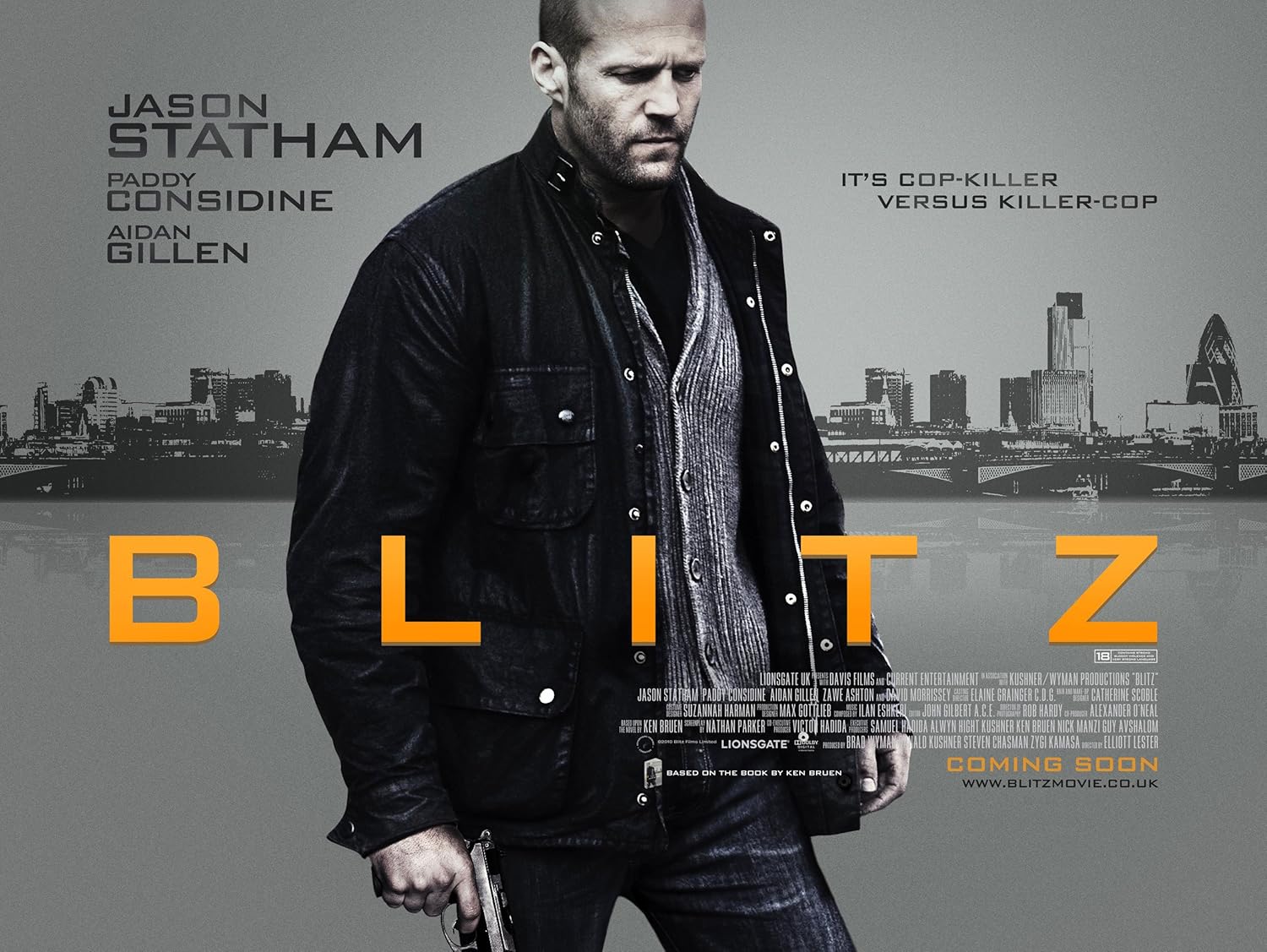
After looking into Blitz I really liked the typeface they used so i researched and in the end found the exact or very similar typeface called Bank Gothic which I will use for my poster as I feel it fits in very well with our genre. I also like how the image of Jason Statham is in black and white as this also indicates possibly the darkness of the film which is also similar to our film which I hope to use for my poster.


Magazine Front Cover Progression

After reviewing the feedback I was able to make some changes to improve my front cover as a whole. Firstly one of the main problems was how unclear and dark the cover was, after second look I also felt it was to dark. I wanted to keep the metallic looking background as I felt it worked well so reduced the opacity to lighten it up which made the image become more clear. Also I had noticed on the majority of Little White Lies covers the actor is looking straight ahead where as on my cover the image is looking to the side. I felt the image worked and felt I would break the codes and conventions in terms of this for my cover. The positioning of the text didnt work to well to I experimented moving it about and in the end from suggestions people said due to the direction of the eyes in the image positioning it to the left hand side may work well, I still wanted to keep the font and its colours as people really liked this on the cover as they felt it showed good contrast between the darker colours. 

Also apart from above Louisa mentioned there could be more detail in the centre as the face appeared rather blank compared to the lower half of the cover. I didnt want to add more detail lines as I didnt want to make the image to realistic so instead I had some brushes in Photoshop which replicated concrete crack and mud splats which i placed around the face and body which seemed to work well and again fitted in with the genre of the film aswell as the cityscape and metallic background.